

As a seasoned supplier of LED tags, I understand the importance of keeping the information on these tags up - to - date. LED tags are versatile devices used in various industries, such as retail, logistics, and asset management. They offer real - time visibility and can significantly enhance operational efficiency. In this blog post, I'll share some insights on how to update the information on an LED tag.
Understanding the Types of LED Tags
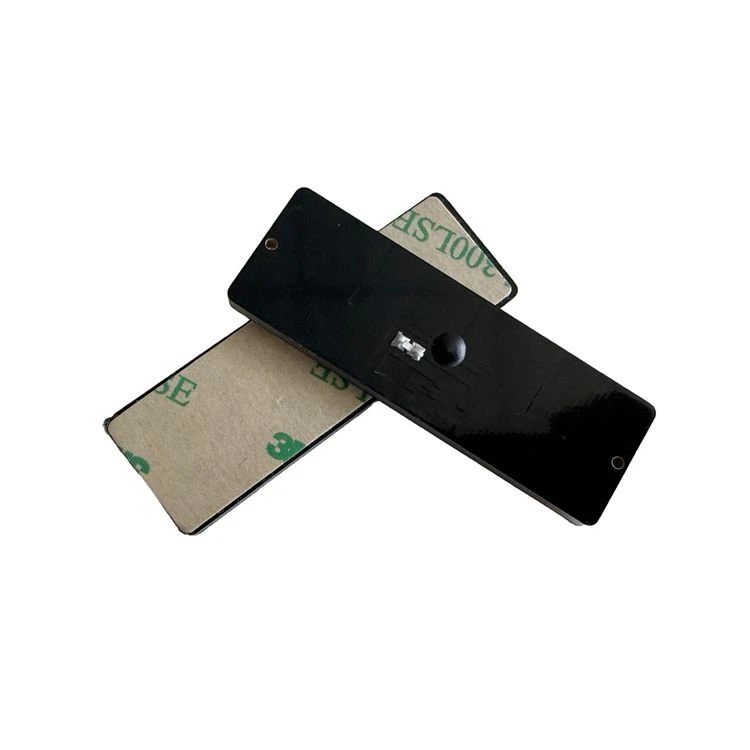
Before delving into the update process, it's crucial to understand the different types of LED tags available. There are mainly three types that we supply: RFID UHF LED Tag, RFID LED Light Tag, and Bluetooth Tag. Each type has its own unique features and methods for information updates.
RFID UHF LED Tags
RFID UHF (Ultra - High Frequency) LED tags are widely used for inventory management and supply chain applications. These tags can communicate with RFID readers over a relatively long distance, typically up to several meters. The UHF frequency allows for fast data transfer, which is essential when dealing with a large number of tags.
To update the information on an RFID UHF LED tag, you'll need an RFID reader that supports the specific protocol used by the tag. Most modern RFID readers come with software that allows you to interface with the tags. First, connect the RFID reader to your computer or a mobile device. Then, open the reader's software and configure it to communicate with the tag. Once the connection is established, you can send new data to the tag. This data can include product information, pricing, or any other relevant details.
RFID LED Light Tags
RFID LED light tags combine the functionality of RFID technology with LED lights. These tags are often used in retail environments to highlight products and display dynamic pricing information. The LED lights can be programmed to change colors or flash, attracting customers' attention.
Updating the information on an RFID LED light tag is similar to the process for RFID UHF tags. You'll use an RFID reader, but in this case, you may also need to control the LED lighting features. The reader's software usually has a user - friendly interface that allows you to set the lighting patterns and update the text or graphics displayed on the tag. For example, if there's a new promotion, you can change the price and the lighting effect simultaneously.

Bluetooth Tags
Bluetooth tags are ideal for applications where short - range communication is required. They are commonly used in asset tracking and indoor navigation systems. Bluetooth tags can connect directly to a smartphone or a tablet, making it easy to update the information on the go.
To update a Bluetooth tag, you'll need to download the corresponding mobile app. Once the app is installed, turn on the Bluetooth function on your device and pair it with the tag. After pairing, you can access the tag's settings and update the information. The app usually provides a simple interface where you can enter new data, such as the location of an asset or a unique identifier.
Factors Affecting Information Updates
Several factors can affect the process of updating information on an LED tag. These factors need to be considered to ensure a smooth and successful update.
Tag Battery Life
Most LED tags are battery - powered. A low battery can cause problems during the update process. Before attempting to update the information, check the battery level of the tag. If the battery is low, replace it or recharge it, depending on the type of battery used. This will ensure that the tag has enough power to receive and process the new data.
Environmental Conditions
The environment in which the LED tag operates can also impact the update process. For example, extreme temperatures, humidity, or electromagnetic interference can disrupt the communication between the tag and the reader. Make sure to perform the update in a stable environment. If the tags are used in harsh conditions, consider using tags that are designed to be more resistant to environmental factors.
Data Compatibility
When updating the information on an LED tag, the new data must be compatible with the tag's storage capacity and format. For instance, if the tag has limited memory, you may need to compress the data or remove some unnecessary information. Also, ensure that the data is in the correct format that the tag can understand.
Best Practices for Updating LED Tag Information
To ensure a seamless update process, here are some best practices that I recommend.
Regular Testing
Regularly test the LED tags to ensure that they are functioning properly and can receive updates. This can help you identify any potential issues early on and take corrective actions. You can use a test reader or a sample set of tags to perform these tests.
Backup Data
Before updating the information on a large number of tags, it's a good idea to backup the existing data. This way, if something goes wrong during the update process, you can restore the original information. You can store the backup data on your computer or a cloud - based storage system.
Training Staff
If you have employees who are responsible for updating the information on the LED tags, provide them with proper training. Make sure they understand how to use the RFID readers, the software, and the mobile apps. Training will reduce the likelihood of errors and ensure that the updates are performed correctly.
Troubleshooting Common Issues
Even with careful planning, you may encounter some issues when updating the information on an LED tag. Here are some common problems and their solutions.
Connection Issues
If you're having trouble connecting the RFID reader or Bluetooth device to the tag, check the following:
- Make sure the reader or device is within the operating range of the tag.
- Check the power supply of the tag and the reader.
- Ensure that the software on the reader or device is up - to - date.
Data Transfer Errors
If the data transfer fails, it could be due to a corrupted data packet or interference. Try resending the data. If the problem persists, check the integrity of the data and the communication protocol. You may also need to restart the reader or the device.
Conclusion
Updating the information on an LED tag is a critical process that can enhance the functionality and effectiveness of these devices. Whether you're using RFID UHF LED tags, RFID LED light tags, or Bluetooth tags, understanding the update process and considering the relevant factors will ensure a successful update.
As a supplier of high - quality LED tags, we are committed to providing our customers with the best products and support. If you're interested in purchasing LED tags or need more information on how to update them, we'd love to hear from you. Feel free to reach out to us to discuss your specific requirements and start a procurement negotiation.
References
- RFID Handbook: Fundamentals and Applications in Contactless Smart Cards, Radio Frequency Identification and Near - Field Communication by Klaus Finkenzeller
- Bluetooth Core Specification, Bluetooth Special Interest Group
- LED Lighting Technology: A Guide to the Science and Application of LEDs by Michael F. Schubert and Erik F. Schubert


